Filming yourself on iPhone Duo: what Fold Cue 1.1 changed once I could hold one
Fold Cue 1.0 was designed in a simulator, around two people: one reading, one filming. On a real iPhone Duo the more useful default is one person filming themselves with the good camera. Here is what that took in 1.1: a preview on the outer screen, a button you have to hold, a camera that survives a fold, and a crash I had to design out.

Fold Cue is my teleprompter that records you. The script scrolls as you speak and waits when you stop. On iPhone Duo it does the thing I built it for: you stand the phone up with the backs towards you, the script sits on the outer screen right beside the 48MP main camera, and you read straight into the lens.
I designed all of that before I could hold a Duo, and I wrote about designing around an outer screen I couldn’t test. Fold Cue 1.0 was built and checked in Apple’s simulator. Version 1.1 is the first one shaped by a real iPhone Duo, and the biggest change in it isn’t a feature. It’s who the app thinks is holding the phone.
1.0 assumed a second person
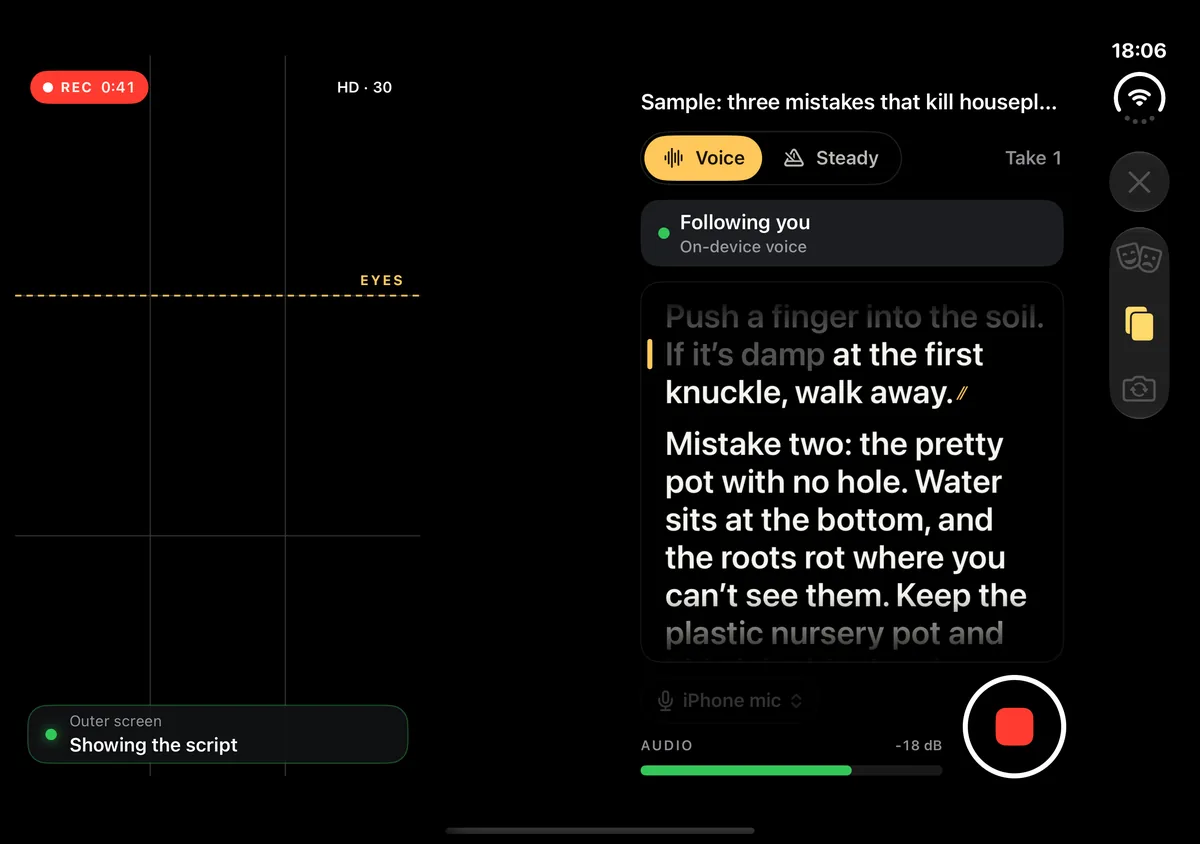
In 1.0, when you filmed with the main camera on the open Duo, the inner screen became a director’s view. The framing on one side, the script, the sound level, the takes and the record button on the other. It’s a good layout, and it’s still in the app. But it’s a layout for someone else. The person reading faces the outer screen, and the inner screen faces away from them.
If you’re filming yourself, that’s a problem. Everything useful before a take, like whether you’re in frame, was on the screen you couldn’t see. And the outer screen only had the script and a couple of big buttons on it.
So in 1.1 the default flipped. On the open Duo with the main camera, Fold Cue now assumes you’re alone. The outer screen is your whole studio, and the inner screen, which nobody is looking at, goes dark and quiet. It says “Turn the phone around”, shows the stand guide for the moment before you do, and has one button: “Someone films me”. Tap that and you get the director’s view back, with a “Just me” button to return. The choice is remembered, so if you always film with a friend, you only tap it once.
What the outer screen needed
Once the outer screen was the only screen you’d see, it needed three things it didn’t have.
A preview of you. Before a take, the camera preview now sits above the script, so you can frame the shot. With the phone open flat in a stand, where the outer screen is wide, the preview and the script sit side by side instead, with the script on the side of the lens. When the countdown starts, the preview goes away, so before your first word there’s only the script, standing still.
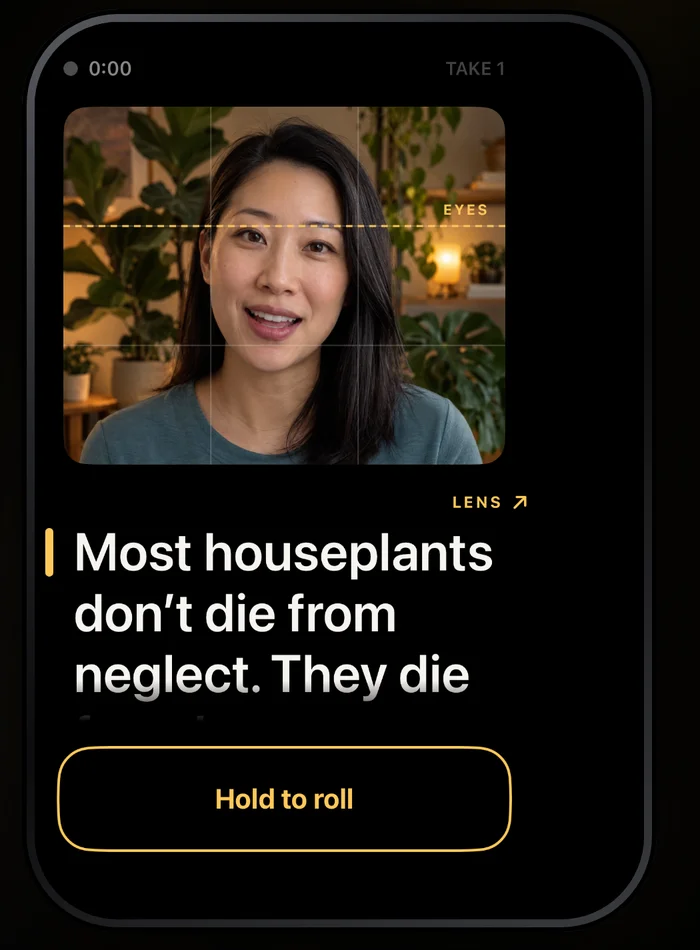
A mirror, but only for you. People expect to see themselves the way a mirror shows them, so the preview is flipped. My first try was the obvious one, the mirroring setting on the capture connection, and on the Duo it didn’t change the picture. So the flip is done on the view instead, with a plain scaleEffect(x: -1, y: 1). That has a nice side effect: only what you see is mirrored. The recording stays the right way round, so text on your shirt or a sign behind you isn’t backwards in the video.
A record button you have to hold. When you hold the open Duo, the hand holding it touches the outer screen. A normal button would start takes by accident. So the outer screen has “Hold to roll”: the outline fills while your finger is down, and the take starts after 0.8 seconds. A finger that just rests there while you hold the phone does nothing. With VoiceOver on, it activates at once.
Camera up, camera down
The stand guide in 1.0 suggested a range of hinge angles to stand the phone at, and the post about it said that range was a guess until I had the hardware. The guess was too narrow. Fully open, flat in a stand, turned out to be a good pose too, because the outer screen ends up right under the camera. So the range now runs from 145 degrees all the way to flat.
Flat in a stand also means the phone can stand two ways: with the camera half at the top, or turned over with it at the bottom. Fold Cue supports both. It reads the window’s orientation, and when the lens is below the screen, the layout turns around: the controls go to the top, the script to the bottom, and the reading line moves so the next lines run down towards the lens. The little “LENS” arrow above the reading line points up and right in one pose and down and left in the other. Those directions came from standing a real Duo up both ways, not from the simulator.
The preview needed the same care. On the outer screen, the angle the system’s rotation coordinator gave me for the preview was wrong: 180 degrees off with the camera up, 90 with the camera down. The system already turns the outer screen upright for the reader, so the preview now uses the capture angle there instead, and it re-reads the angle whenever the view moves between the inner and the outer screen.
A fold shouldn’t stop the camera
Folding or unfolding the Duo moves Fold Cue between screens, and SwiftUI can tell a view it disappeared and then appeared again while that happens. My capture screen treated “disappeared” as “the user left”, so it shut the camera down. Then nothing started it again, and you came back to a frozen preview.
On the Duo, the screen came back 15 to 50 milliseconds after a fold. So tearing down now waits half a second. If the screen reappears in that time, the teardown is cancelled, and the session keeps running. And any camera change now ends by making sure the session is running, because a fold during that change could stop it too.
The same idea is meant to protect a take in progress: fold during a recording, and the take should keep going. Fold Cue already saves everything up to an interruption, which I wrote about in takes that survive a phone call, but keeping the take alive is better than saving half of it.
The crash I designed out
1.0 had a crash that only a fold could cause. When you rotated the phone, Fold Cue set the new angle on the camera connection from its capture queue, which rebuilt part of the capture setup there. On the Duo, if a fold changed the main display at that same moment, AVFoundation called the rotation coordinator from that queue. The coordinator expects the main queue, checks for it, and the app stopped.
The fix was to stop changing the connection at all. The rotation is now only stored. When the next take starts, it goes into the video track’s transform on the asset writer, as a turn of 0, 90, 180 or 270 degrees from the angle the camera buffers already have. The video player applies it. Nothing in the capture setup changes mid-session, so there’s nothing for a fold to collide with. It’s also a function of two numbers, which made it easy to cover with tests for every turn.
I built 1.1 with Claude Code, mostly with Opus 5.5, like the rest of my apps these days. The fix itself is small. What made it work was the decision behind it: don’t touch the connection.
What I still haven’t seen
My commit for 1.1 lists what wasn’t tested on hardware when it shipped: the rotation of the recorded videos, the crash fix, and a fold in the middle of a take. The tests pass, and the reasoning holds, but I’d rather say so than pretend. 1.1 was submitted the day after the iPhone Duo went on sale and was live that night.
The lesson from the whole update is a small one. In the simulator I designed for the situation I imagined, a crew of two. 1.1 starts from one person, alone, filming themselves with the best camera on the phone. That’s the default now, and the crew of two is one tap away.
If you film yourself
Fold Cue is on the App Store for iPhone. Filming is free, with no watermark and no time limit, and the whole iPhone Duo setup, solo mode included, is in the free app. Pro is one optional purchase for captions from your script, 4K, take scoring, iCloud sync of scripts and Final Cut Pro projects. No subscription, no ads.
If you have a Duo and nobody to hold it, Fold Cue is on the App Store. Stand it up, turn it around, and hold to roll.