Test your comic server before you pay: where I put ComicFlow's paywall
ComicFlow 3.7 reads from Komga, Kavita and OPDS servers, and all of it is part of Pro. A paid feature that depends on someone else's setup has an obvious risk: you pay, and it doesn't connect. So the paywall waits until your server has answered. Getting the one sentence that explains this right took me three tries.

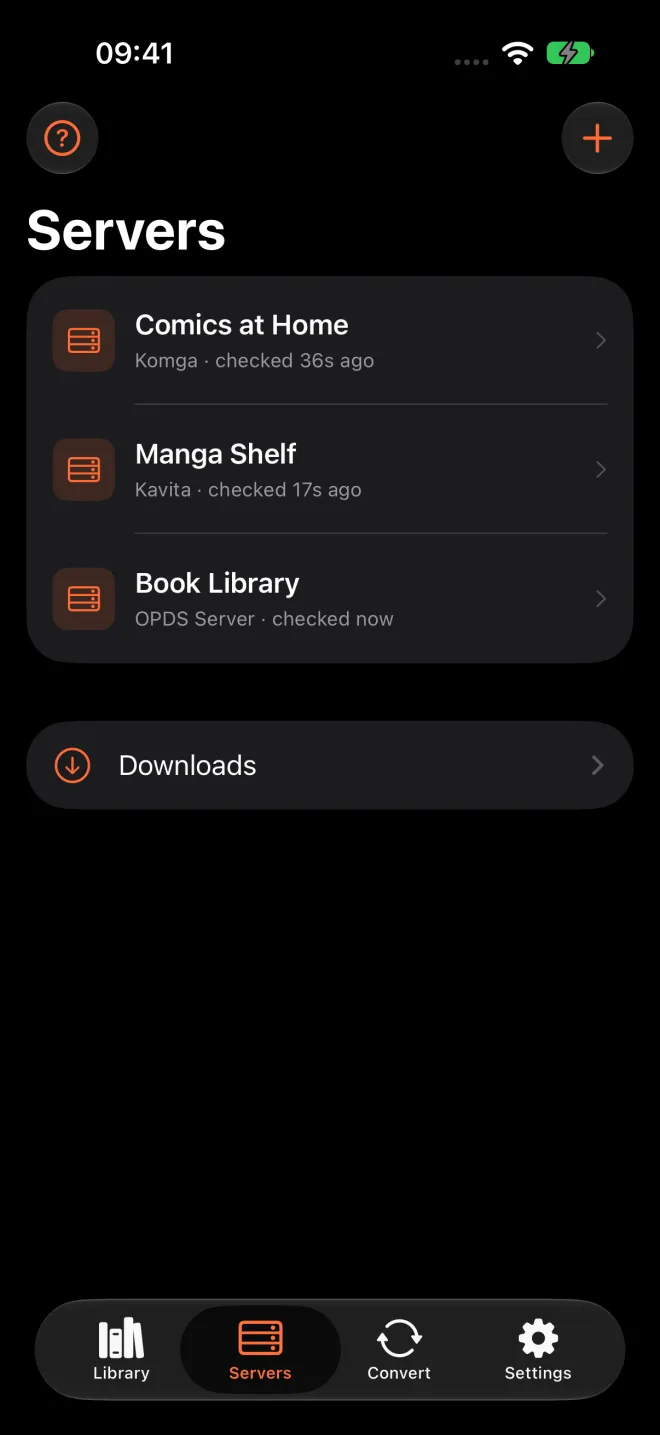
ComicFlow costs $2.99 once. Pro is an optional $6.99 unlock, also once, with no subscription. Since 3.7 there’s a Servers tab in the app, and if your comics live on a Komga, Kavita or OPDS server at home, ComicFlow can browse that collection, stream a book, download it for offline and keep your page in sync with the server. All of that is part of Pro.
That decision raised a question I hadn’t had to answer for any other Pro feature. Where do you put the paywall when the feature only works if the buyer’s own setup works?
A feature that depends on your setup
Most of ComicFlow’s Pro features are easy to judge from the outside. Face ID on a collection, reader presets, sending a comic to a Kobo: you can see them in the screenshots, and they either suit you or they don’t.
A comic server is different. Whether ComicFlow can read yours depends on things I can’t see and don’t control. The address you type. Whether the server is on your home network, behind Tailscale or out on the internet. Whether it uses HTTPS, plain HTTP or a self-signed certificate. Which kind of sign-in it wants. I tested against a whole rig of servers before release, and I wrote about the week of testing on a real iPhone. But my rig is not your NAS.
When I planned the feature, my notes had a table of one-star reviews from another comic reader app. Two of them were about exactly this. One kind of reviewer couldn’t test a network connection before paying for it. The other kind paid, and then it didn’t work with their setup. Those are miserable reviews to get, because the person is right. They spent money on something that never worked for them even once.
The paywall waits for your server
So the rule in ComicFlow is: the paywall never comes before a successful connection.
Without Pro you can open the Servers tab, tap Add Server, type your server’s address and sign-in, and tap Test. ComicFlow connects, works out what kind of server it is, and either says it’s connected or tries to tell you what went wrong. If it fails, you can fix a port or a password on the server side and test again.
Only when the test has passed and you tap Save does Pro come up. A small note in the sheet says so before you get there: “Saving a server needs ComicFlow Pro.” The idea is simple. By the time I ask for money, your server has already answered my app.
It isn’t a free trial, and I didn’t want it to feel like one. You can’t browse the library or read a page without Pro. What you get is proof that the thing you’re about to pay for can reach the thing you own.
The original plan was looser. Connecting, browsing and downloading were going to be included, with streaming and sync in Pro. A few days before release I changed that, and now everything about servers is Pro. Watch folders and Wi-Fi Upload, the two ways to get comics onto the phone without a cable, are still included in the $2.99 app. If your comics sit on a NAS as plain files, you can mount the share in the Files app and point a watch folder at it. You don’t need a server for that.
One sentence, three versions
The empty Servers tab ends with a short hint about Pro. Its first version said:
Test the connection for free. Using a server needs ComicFlow Pro.
That looks harmless. But ComicFlow has a house rule: nothing in it is ever called “free”. It’s a paid app. When you write “free” inside a paid app, some people read it as “the app is free”, and later they’re surprised or annoyed. The word doesn’t help anyone, so it goes. Features are “included” or work “without Pro”.
So on 18 October, while I was getting 3.7 ready for review, I rewrote it:
You can add a server and test it without Pro. Reading from it is part of ComicFlow Pro.
No “free”, so the rule was happy. The sentence was wrong, though. You can fill in the Add Server sheet and test it without Pro, but saving the server is the exact moment the paywall appears. “Add” promised a step the app doesn’t let you finish. I had fixed one word and made the whole claim false.
The fix went in about an hour and a half later. That meant a new build, and the same sentence changed again in all 18 languages. The version in the app now says:
You can test the connection without Pro. Reading from a server is part of ComicFlow Pro.
It’s the most boring version of the three, and it’s the only one that’s true. The App Store description says the same thing, and on my websites ComicFlow’s features are “included” or “part of Pro”.
Telling people they might not need it
Fixing the hint showed me a bigger gap. The Servers tab assumed you already knew what Komga or Kavita is. Lots of people who read comics on their phone have never run a server, and there’s no reason they should.
So 3.7 also has a short guide called “What’s a comic server?”. It opens from a help button on the Servers tab and from a link under Add Server when the tab is empty. It says four things:
- What a server is. An app on a computer at home that keeps your whole collection in one place. ComicFlow doesn’t run a server or host comics. It connects to one you set up yourself.
- Whether you need one. Not to use ComicFlow. If your comics are files on the phone or in iCloud Drive, the Library tab is all you need. A server helps when your collection is large or you read on several devices.
- How to get one. Install Komga, Kavita or Calibre on a Mac, a PC or a NAS, point it at your comics folder, then come back and add it.
- How to read away from home. Put Tailscale on the server and on the phone, then add the server with its Tailscale address.
The guide does use the word “free”, for Komga, Kavita, Calibre and Tailscale. They really are free, and they aren’t mine. The rule is about my app, not the whole world.
The second point is a strange thing to put next to a paywall. It’s a screen inside my app telling some people they don’t need the thing I’m selling on that tab. I think it’s right, though. Someone who buys Pro for a server they don’t have isn’t a customer I’ve won. It’s a refund and a bad review waiting to happen. Someone who reads the guide, sets up Komga on an old Mac and comes back is someone the feature was built for.
What I’m watching
Putting all of servers in Pro is a real bet. Some people will feel that just connecting to their own server should be included, and I understand that. Testing before you pay is my answer to the worst version of that complaint, the one where you pay and it doesn’t work. It isn’t an answer to all of it.
So the thing I’m watching over the next weeks is simple. When someone’s server passes the test and the paywall comes up, do they buy? If they don’t, I’ll learn something about the price or the feature. If they do, the paywall is in the right place.
If your comics live on a server
If you run Komga, Kavita, Calibre or another OPDS server and read on an iPhone or iPad, you can put my word to the test. Get ComicFlow on the App Store, open the Servers tab and tap Test. If it connects, Pro is $6.99 once. If it doesn’t, you’ve found out before paying for it. And if your comics are just files, the $2.99 app already reads them.