Reading the hinge on iPhone Duo, and designing around what Apple won't promise
iOS 27.1 gives every app the iPhone Duo's hinge status and a live angle, with no entitlement. The API is small. The interesting part is the one promise Apple leaves out, and how to design an interaction that doesn't need it.

The hinge was the first thing I looked for in the iOS 27.1 SDK, because it’s the one part of iPhone Duo no other iPhone has. I half expected it to be private, or behind an entitlement, or only exposed as a layout change.
It’s none of those. Any app can read it, in SwiftUI or UIKit, and the headers are short enough to read in one sitting.
SwiftUI
The modifier is onHingeChange. It hands you the old and the new context, and the context holds an optional hinge:
struct PageView: View {
    @State private var isPartlyOpen = false

    var body: some View {
        Content(isPartlyOpen: isPartlyOpen)
            .onHingeChange { _, new in
                guard let hinge = new.hinge else {
                    // No hinge on this device.
                    isPartlyOpen = false
                    return
                }
                isPartlyOpen = hinge.status == .partiallyOpen
            }
    }
}
DeviceHinge has a status and an angle, and the angle is a SwiftUI Angle. A nil hinge means the device doesn’t have one, which is what every other iPhone reports.
One small surprise: DeviceHinge.Status is a struct with static members, not an enum. You compare against .closed, .partiallyOpen and .fullyOpen, but a switch over it needs a default case.
UIKit
UIKit uses an interaction, the same pattern as pointer and drag interactions:
let interaction = UIHingeInteraction { [weak self] _, update in
    guard let self else { return }
    guard let hinge = update.hinge else {
        self.hingeBecameUnavailable()
        return
    }
    self.apply(status: hinge.status, angle: hinge.angle)
}
view.addInteraction(interaction)
The handler fires once with the current state and again on each update. It also fires when the view moves between hierarchies, and the hinge is nil when the view has left a hierarchy that provides hinge updates. The UIKit status has an extra .unknown case the SwiftUI one doesn’t.
Two details that bit me on first read. The UIKit angle is a CGFloat in radians, while the SwiftUI angle is an Angle, so shared code needs to pick one. And a disabled interaction doesn’t queue updates: turn it back on and you get the current state once, not the history you missed.
There’s nothing in Core Motion, Game Controller or Metal. If a game wants the hinge, it reads it through UIKit or SwiftUI like everyone else.
The promise Apple leaves out
This is the line in the header I keep coming back to. On UIKit’s UIHinge.angle, Apple writes that the rate and granularity of updates are system policy and can change with system state, so you shouldn’t depend on a particular update frequency or precision. The SwiftUI documentation doesn’t repeat it, but I’d assume the same policy applies. If you only need to know whether the hinge is closed, partly open or fully open, use status.
That’s an unusually direct warning. It means an interaction that needs a smooth, fine-grained stream of angles might work on one day and feel rough on another, depending on things the app can’t see. I can’t test how rough in the simulator, because there I’m driving the hinge myself, so it can’t tell me what update rate real hardware delivers.
So I’ve started designing hinge interactions in three tiers.
Status first. Anything that can be expressed as closed, partly open or fully open should be. The system decides the status from the angle and the device’s orientation, so you inherit Apple’s judgement about where the boundaries are.
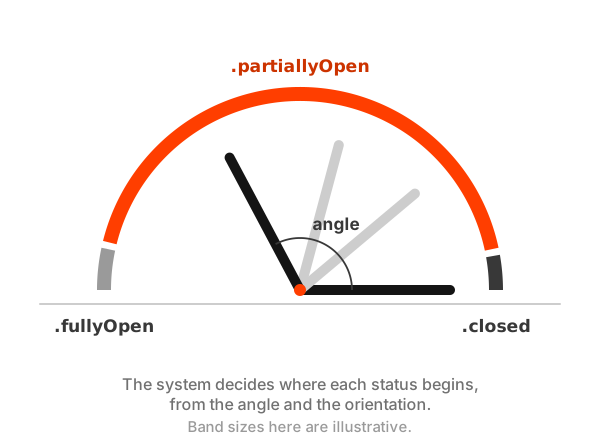
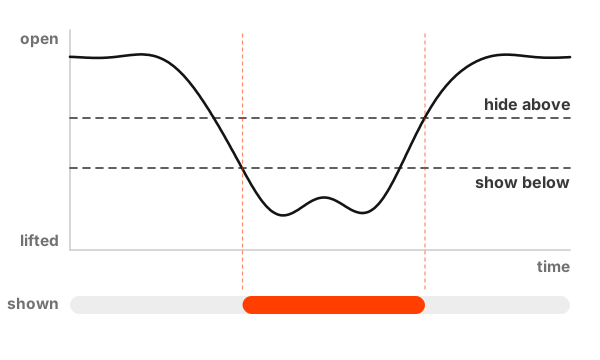
Thresholds second. Some interactions need a boundary Apple doesn’t define, like “this half has been lifted far enough”. Those use two thresholds rather than one, so a hinge hovering near the boundary doesn’t flicker:
struct LiftDetector {
    var showBelow: Angle
    var hideAbove: Angle
    private(set) var isLifted = false

    mutating func update(with hinge: DeviceHinge) -> Bool {
        if !isLifted, hinge.angle < showBelow { isLifted = true }
        if isLifted, hinge.angle > hideAbove { isLifted = false }
        return isLifted
    }
}
A threshold only needs the angle to cross a line eventually. It doesn’t care how many updates arrived on the way.
Continuous last. Interactions that follow the angle directly, like a bellows or a lever, are the most fun and the most exposed to that warning. I’m building them, but with smoothing between updates, and with the expectation that they’ll need tuning the day I hold real hardware.
Don’t lay out with it
The other thing Apple is clear about is that the hinge isn’t a layout tool. When the device is partly open, the fold becomes a reserved region of the view, and that’s what layout should read. ComicFlow’s reader finds the fold that way and never looks at the angle at all.
It took me a while to see why that split matters. Layout that follows the angle reflows every time someone adjusts their grip. Layout that follows the fold region changes once, when the fold appears, and then leaves the content alone.
The hinge ended up being less of a sensor than I imagined and more of a switch with a dial attached. The switch is dependable. The dial is a bonus, and I’m designing as if it might not always be there.