The iPhone Duo's inner screen is drawn larger than its panel
The simulator, App Store Connect and Apple's spec sheet give different pixel sizes for the iPhone Duo's inner display. None of them is wrong. The simplest explanation is that the system renders larger than the panel and scales down, which is one more reason to lay out in points.
When I first booted the iPhone Duo simulator, I read the display sizes straight out of the runtime and wrote them in my notes as settled. The inner display’s pixel size didn’t match what the press had been reporting, so I wrote down that the press figure was wrong.
It wasn’t. The press figure came from Apple’s own spec sheet. I had found two correct numbers and assumed one of them had to be a mistake.
Three sources, two answers
There are three places a developer would look for the size of the inner display:
- The simulator, which reports the size in points and a scale factor.
- App Store Connect’s screenshot specifications, which list the pixel size for Duo screenshots.
- Apple’s technical specifications page, which lists the panel’s resolution and pixel density.
The first two agree with each other. The spec sheet lists a smaller resolution than both of them, and a lower pixel density than the outer display.
The outer display has no such gap. Its size in points times its scale factor lands exactly on the panel resolution Apple lists. Only the inner one differs. The exact figures are in the developer reference.
What is probably going on
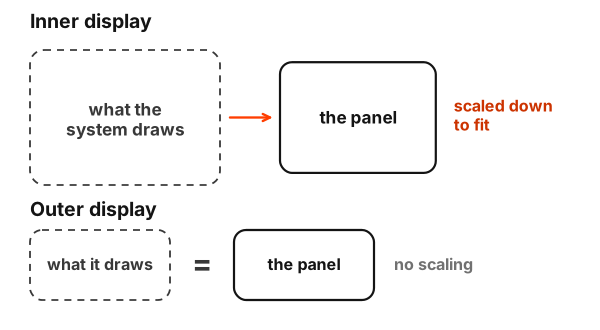
The inner display appears to render at its size in points times its scale factor, then get scaled down onto a panel with fewer physical pixels. iPhone 6 Plus did the same thing years ago: the system drew a frame larger than the screen and downsampled it, so apps could work at a clean scale factor while the hardware used a panel that didn’t divide evenly.
I should be clear that this is my reading of the numbers. Apple doesn’t say it anywhere I’ve found. But it’s the simplest explanation that makes all three sources right at once, and it fits how the outer display behaves.
The simulator’s own display profile points the same way. It describes the inner screen at the same density as the outer one, and scaling that down to the density on Apple’s spec sheet lands almost exactly on the panel’s resolution.
Why it doesn’t change anything in your code
If your app lays out in points, none of this reaches you. SwiftUI and Auto Layout work in points, the simulator reports points, and the scale-down happens after your frame is finished. A layout that looks right in the simulator will look the same size on the panel, just drawn with slightly fewer physical pixels.
Where it can reach you:
Pixel-exact artwork. A hairline one rendered pixel wide lands on slightly less than one physical pixel, and it may shimmer. Prefer strokes that survive scaling.
Anything that reads the screen. Code that asks UIScreen.main for its size is building on the wrong foundation anyway. It has been deprecated since iOS 26, and on a device with two displays it’s ambiguous which screen you’d even get. If you render pixel-exact content with Metal, read the native scale from your view’s own screen, the way Apple advised for iPhone 6 Plus, rather than from UIScreen.main. Read sizes from the scene or the view you’re drawing in.
Screenshots. App Store Connect wants the rendered size, not the panel size. The simulator’s screenshots already come out at the rendered size, so capture from there.
Points were always the contract
The iPhone has had enough screen sizes that most of us stopped thinking in pixels years ago. The Duo is the first device in a while where that habit is doing real work, and where the spec sheet and the developer tools can disagree without either of them being wrong.
I’d rather have found this by reading more carefully than by correcting my own note. Two numbers that don’t match are usually two numbers measuring different things, and this time they were.