Following a voice through a script, on the device
Fold Cue's script scrolls as you speak and waits when you stop. The hard part isn't hearing the words. It's deciding where in the script the speaker is right now, and never guessing out loud.
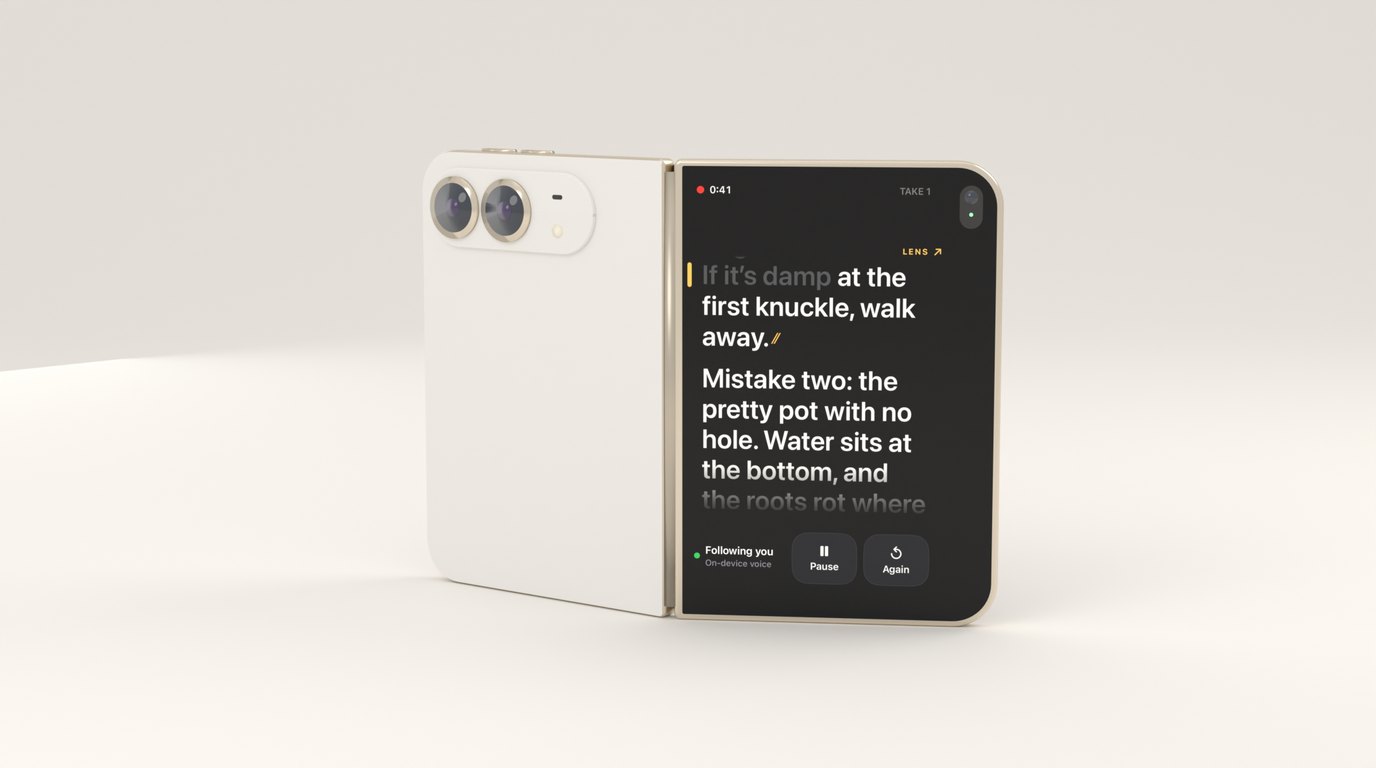
Fold Cue is a teleprompter that records you. The script scrolls as you speak, and it waits when you stop. That one behaviour is the whole product, so it was the first thing I built and the thing I tested hardest.
Before writing any of it I read a lot of reviews of other teleprompter apps that scroll by voice. The complaints were remarkably consistent. The text stops moving and nothing says why. It races ahead during an ad-lib. It drifts over a long session until it’s reading somewhere else entirely. Nobody complained that recognition was slightly wrong. They complained that the app was wrong without saying so.
So the engine has one rule above the others: it may lose you, but it must never pretend it hasn’t.
Two kinds of words
Speech comes from SpeechAnalyzer with a SpeechTranscriber, which is new in iOS 26 and runs entirely on the device. Once the language model is downloaded it works offline, and no audio, transcript or script leaves the phone.
The transcriber gives you two kinds of result. Volatile results arrive quickly and keep changing as it hears more. Final results arrive a little later and don’t change again. A teleprompter needs both: volatile words to move the text without lag, and final words, with their audio time ranges, for everything that happens after the take.
let transcriber = SpeechTranscriber(
    locale: locale,
    transcriptionOptions: [],
    reportingOptions: [.volatileResults, .fastResults],
    attributeOptions: [.audioTimeRange, .transcriptionConfidence]
)
Each take gets its own analysis session, and the model stays loaded between them. The script’s rare words, like names and brand terms, go in as contextual strings, which helps the recogniser with exactly the words a general model is most likely to get wrong.
Every heard word is normalised before it gets near the script: lower case, curly quotes folded, punctuation stripped, and figures written out as words in the script’s language. Nobody reads a figure aloud as digits, so the script has to meet the speaker halfway.
Where is the speaker right now?
This is the real problem. The follower takes the last handful of heard words and aligns them against a small window of the script around the current position, reaching a little behind and further ahead. It’s Smith-Waterman local alignment, the same idea biologists use to find where a short sequence sits inside a long one.
Two details make it work for speech. Words match fuzzily, by the share of letters they have in common, so “recognise” still matches “recognize”. But below a floor a word scores nothing at all, so a badly misheard word doesn’t drag the alignment somewhere odd, and its neighbours carry it instead. And the alignment has to end on the newest word heard, because the question isn’t “where does this phrase appear” but “where is the speaker now”.
Small words like “the” and “and” count for less. They’re everywhere, so they’re weak evidence of position.
Forward is cheap, backward is expensive
The position moves on different levels of evidence, and they’re deliberately lopsided:
if let r = local, r.score >= tuning.acceptScore, r.matches >= tuning.acceptMatches {
    // modest evidence, just ahead of where we were: move forward
    if r.end > position { position = r.end; moved = true }
} else if let j = aligner.align(heard, script, in: (position + 1)..<end),
          j.score >= tuning.jumpScore, j.matches >= tuning.jumpMatches {
    // strong evidence further on: the speaker skipped ahead
    position = j.end; jumped = true
} else if update.time > anchorUntil,
          let b = aligner.align(heard, script, in: earlier),
          b.score >= tuning.backScore, b.matches >= tuning.backMatches {
    // very strong evidence behind: the speaker really did go back
    position = b.end; jumped = true
}
Reading on is what people do almost all the time, so it needs only a little evidence. Skipping a paragraph happens, so a jump is allowed, but only when many words agree. Going back is rare and a wrong backward move is the most disorienting thing a prompter can do, so it needs the most evidence of all. It also happens on purpose when you say “again”, which ends the take and starts a new one from the top.
If you nudge the text by hand, by tapping a word or dragging a line, the follower takes that as the new position and ignores backward evidence for a moment. Without that, it would sometimes snap back to where it thought you were, which is exactly the fight with the app that people complain about.
An ad-lib never moves the text
When speech keeps coming but matches nothing, the position stays put. An aside, a joke or a reworded sentence shouldn’t scroll the script.
If it goes on for a while, the state changes from following to lost, and the prompter says so: “Lost you. Say the line again.” There are only a few states, listening, following and lost, and one of them is always on screen while you record. That small status line answers the question every review was really asking, which is whether the thing is still listening.
Silence stops the text for free. There’s no separate silence detector: the text only moves when heard words line up with the script, so a pause, or a noisy room, can’t scroll it. I’d planned to use the speech detector as an extra signal, but in the spike it never reported anything, and the follower turned out not to need it.
Commands that aren’t lines
Fold Cue listens for spoken commands between lines: “cut” saves the take, “again” saves it and starts a new one from the top, “keep” said after a cut stars the take you just saved, and “hold on” holds the script. The trouble is that scripts contain those words. “Cut the stems at an angle” is a line, not an instruction.
So a command only counts when it’s said on its own. It has to be a very short utterance between pauses, and it must not line up with the script where the speaker is:
guard !words.isEmpty, words.count <= maxWords,
      silenceBefore >= minSilence, silenceAfter >= minSilence,
      scriptScore < readingThreshold else { return nil }
It acts on final results, which the recogniser only delivers after a pause, so the pause afterwards comes with the result rather than being timed separately. Fillers like “um” and “okay” are dropped first, so “okay, cut” still works. The command’s time range is kept, padded slightly, so Pro can trim it out of the finished video. Commands work in English and German; scripts in other languages use the English words.
Moving by line, not by word
The prompter moves by whole lines, never word by word. Text that shuffles under your eyes is harder to read than text that stays still and then steps. The line holding the next word to say sits on the reading line, and words already said go grey.
The prototype had a bright highlight on the current word. It looked great in a demo and was tiring to read from, so it went. Now a small amber tick marks the reading line, and nothing else moves until you reach the end of it.
Testing a voice without a voice
The engine lives in a small Swift package, StudioCore, with no UIKit and no AVFoundation. The follower, the command detector, the line planner and the caption builder are all pure Swift and all run as ordinary tests on the Mac. That mattered more than anything else here, because you can’t tune something like this by reading it aloud to your phone again and again.
The first version was a spike on the Mac. I wrote a sample script and a deliberately messy reading of it: an ad-lib, a skipped sentence, a false start, a reworded line and a whole skipped paragraph. It was rendered with the system’s text-to-speech in a British and an American voice, plus a far-field copy with added echo and noise. A small command-line tool streamed each file into SpeechAnalyzer at real-time pace and logged every result with the moment it arrived.
The follower was written first against those logs, as a quick script, and then ported to Swift with the same parameters. The logs became test fixtures. FollowerRegressionTests replays each one through the Swift follower and checks the behaviour: that it keeps up, that an ad-lib moves nothing, and that a skipped paragraph is picked up quickly. Every tuning change has to pass the whole suite.
The far-field fixture passes too, with looser limits on lag than the clean ones: it holds still through the ad-lib and makes the paragraph jump.
Synthetic voices are still the obvious weakness. They’re too clean and too regular. The real-world evidence so far is me reading to my own iPhone, where voice follow and “cut” behaved, and that reading wasn’t captured as a fixture. Nothing has been tested at a distance yet, or on iPhone Duo’s own microphones. The harness that made the fixtures is still in the repo, so every real reading I record from now on can become another one.
The best thing the tests gave me wasn’t confidence that it works. It was the freedom to change the tuning and find out in seconds what I’d broken.